myGMC
- 4.6
- Rating
- 1.00M
- Installs
- Free
- Price

 Analysis by App-foxy
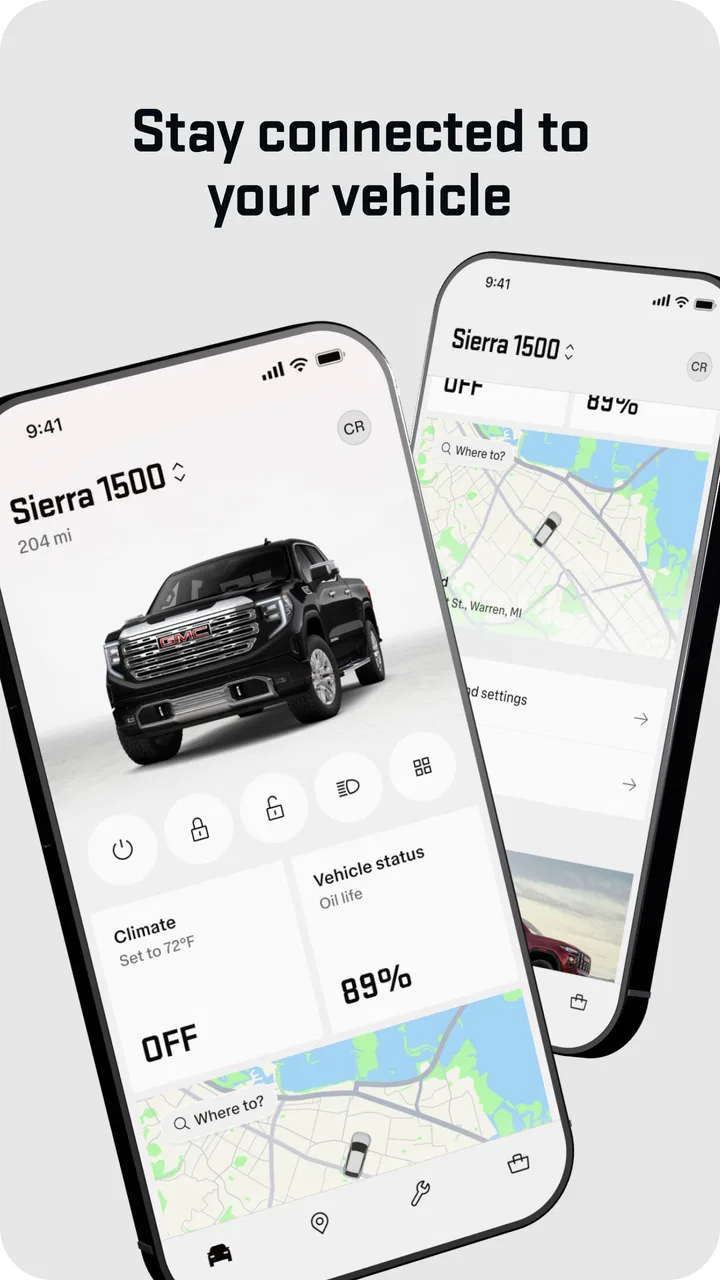
I approached myGMC as the kind of app I would keep on my phone for the less exciting parts of owning a GMC vehicle: checking vehicle information, staying organized, and handling ownership tasks without reaching for a laptop. Developed by General Motors (GM), it is a free lifestyle app for people who already drive a compatible GMC vehicle and want a more direct connection with the ownership experience.
That distinction matters. This is not a general car-shopping tool, a navigation replacement, or a universal maintenance app for every brand. Its value depends on how well it fits your GMC, your account, and the way you prefer to manage vehicle-related information. In my experience, the most convincing reason to use it is convenience: the app puts ownership details in a place that is easier to reach than paperwork, a dealer visit, or a scattered collection of notes.
The app has been available since November 3, 2010, and its current version is 8.9.0. It is rated for Everyone, requires iOS or Android 10 or later, and has passed the one-million-install mark. A 4.7 average from roughly eighty-nine thousand ratings suggests that many owners find the overall experience useful, although a high rating should not be mistaken for proof that every feature works equally well for every vehicle or user.
You May Also Like

 Blood Strike: 2.5 Anniversary
Blood Strike’s Loadouts Turn Every Drop Into a Tactical Gamble
A close look at Blood Strike’s custom loadouts: how fast access to signature weapons reshapes its battle royale rhythm, rewards preparation, and narrows the gap between fights.

 Pandora - Music & Podcasts
Pandora’s Music Is Easy to Start, but Harder to Recover
Pandora’s strength is its low-effort path from a seed to a station. Its weak spot is how much confidence it asks you to place in connection, setup, and quiet recovery.

 8 Ball Pool
 Is Built on Rivalries, Rematches, and Routine
A close look at the rivalries, rematches, shared routines, and unanswered safety questions that turn a quick pool match into a persistent mobile community.

 Samsung Music
’s Quiet Strength Is Playing What You Already Own
Its reach comes less from spectacle than from dependable access to a personal library. That simplicity is both the app’s strongest retention engine and its ceiling.

 AccuWeather: Weather Radar
AccuWeather Review: A Quick, Clear Forecast for Everyday Decisions
For everyday plans, the best forecast is the one you can understand quickly. AccuWeather makes rain timing, radar, and local conditions easy to act on, with a few trade-offs.

 Hill Climb Racing
Why Hill Climb Racing Still Turns Crashes Into One More Run
A tiny car, a bumpy hill and one more upgrade: Hill Climb Racing keeps resurfacing because its simple chaos makes every near-miss feel personal.
More From Our News Desk



How clearly the app supports everyday ownership
I focus this section on whether the app helps me handle ordinary ownership questions without adding another complicated routine. The useful measure is not how many screens it contains, but whether I can find the right vehicle information when I need it and prepare other drivers to do the same. That leads to the practical limits worth weighing before making it part of a household’s routine.
Readability and navigation
The first thing I look for in a vehicle app is whether it helps me answer a question quickly. If I open it because I need a vehicle detail, service-related reminder, or ownership resource, I do not want to hunt through promotional screens or ambiguous labels. The strongest use of myGMC is as a central place for GMC-related information rather than another app that makes me reconstruct my vehicle history from memory.
That centralization can be especially helpful for people who do not enjoy automotive terminology. A driver should not need to understand every technical distinction before finding the relevant area of the app. Clear wording, familiar icons, and a predictable route back to the main vehicle view make a major difference for older drivers, new vehicle owners, and anyone who only opens the app occasionally.
I also find that vehicle apps are easier to use when they separate urgent actions from background information. A person checking something in a parking lot needs a different experience from someone calmly reviewing ownership details at home. When the interface keeps the most practical tasks near the surface, it reduces the mental effort involved in remembering where a feature lives.
One useful habit is to spend a few minutes exploring the app when you are not in a hurry. I would identify the vehicle-selection area, account settings, help content, and any service or support sections before an actual problem appears. That small preparation turns a first-time search into a familiar routine and is particularly valuable for users who find unfamiliar app layouts tiring or confusing.
Text, contrast, and cognitive load
Readability is more than font size. Vehicle apps often combine technical terms, status messages, buttons, and explanatory text, so the quality of the hierarchy matters. I would judge myGMC by whether the primary action is visually distinct from secondary information and whether a message explains what I should do next instead of merely reporting a status.
For users with low vision, the practical question is whether the app remains comfortable with the phone’s system text enlargement and display settings. I would not assume that every screen scales perfectly. Larger text can improve reading but may also cause buttons or longer explanations to wrap differently. Checking the app with your preferred system settings before relying on it for time-sensitive tasks is sensible.
People with dyslexia, attention difficulties, or limited familiarity with vehicle apps may benefit from short labels and consistent placement. They may struggle when the same concept is described with different words in different areas. My advice is to use the app repeatedly for one simple workflow first, such as locating vehicle information, before trying to learn everything at once.
There is also a cognitive trade-off in having many ownership tools together. A single app can reduce the need to switch between services, but it can also make the home screen feel busy. If you only need one function, the number of surrounding options may slow you down. A dedicated note, calendar reminder, or direct dealer contact can still be faster for a narrowly defined task.
Motor and sensory considerations
Touch interaction is manageable for most people when controls are well spaced and the app does not require repeated precision taps. That matters when a driver is using a phone one-handed, wearing gloves, or dealing with reduced dexterity. I would always complete setup and account work while parked, because these tasks demand more attention than a quick glance at a familiar screen.
Users with tremors or limited reach may prefer holding the phone in both hands and increasing the system display size rather than trying to operate the app while moving around the vehicle. A phone stand at home can also make longer ownership tasks less tiring. These are simple adjustments, but they often matter more than a feature list.
Sensory needs vary widely. Some people are sensitive to animation, bright screens, sounds, or unexpected alerts; others depend on visual confirmation because audio cues are not useful to them. I would review the phone’s notification, sound, vibration, and display settings alongside the app’s own options. The important point is not to assume that a vehicle app will automatically match your preferred sensory environment.
For deaf or hard-of-hearing users, written status information is essential. For blind or low-vision users, the decisive question is how consistently the interface works with the operating system’s screen reader and whether controls have meaningful names. I cannot treat compatibility as guaranteed simply because the app is widely used. Anyone who relies on assistive technology should test the exact workflows they need during the return or support period available for their device and account.
Situational access in real life
A realistic example is a family member borrowing the GMC for a weekend trip. Instead of searching through the glove compartment for vehicle details or asking the owner to explain everything from memory, the owner can use the app as a reference point before handing over the keys. I would still provide a spoken explanation and emergency information, but having the relevant ownership material in one place can make the handoff less stressful.
Another scenario is arriving at a service location with a question you thought you would remember. In that moment, a phone-based record is more practical than a folder at home. The benefit is not that the app eliminates every conversation with a dealer or technician; it gives you a better starting point and reduces the chance of forgetting useful context.
Travel creates a different set of constraints. Bright sunlight, poor reception, cold weather, wet hands, and a nearly empty battery can all make a mobile app harder to use. I would open the app before leaving, confirm that I can reach the information I expect, and avoid treating the phone as the only place where important details exist. A screenshot or written backup may be worthwhile for information you know you will need offline.
This is also where the app’s situational value depends on the task. A passenger can help with a lookup, but the driver should not interact with the phone while the vehicle is moving. If you need a function during a journey, prepare it before departure or ask a passenger to handle it. No convenience feature is worth turning a quick check into a distraction.
Three practical ways to get more from it
- Set it up before an urgent need: complete sign-in and vehicle setup at home, then explore the main sections while you have time to read unfamiliar terms.
- Use it as a shared reference: if another household member drives the GMC, agree on which information they may need and show them the shortest route to it rather than assuming they will discover it under pressure.
- Keep a backup for poor conditions: save essential ownership details in an appropriate offline form, because a phone app should not be your only plan in a basement garage, rural area, or low-battery situation.
These habits reveal an important trade-off. The app can reduce clutter and repeated questions, but it works best when the owner prepares it in advance. It is less impressive if you install it only after a problem begins and expect it to solve account, vehicle, and connectivity issues instantly.
Where the experience still has limits
I look at the limits through the situations where a manufacturer-specific app may be less convenient than a broader or simpler option. Vehicle and account dependence can shape how well it fits, while urgent, technical, or accessibility-related needs call for a little preparation rather than assumptions. Those trade-offs help clarify who is likely to benefit most and when another approach may be a better fit.
Account and vehicle dependence
The biggest limitation is built into the concept: myGMC is most useful to GMC owners, and the experience may vary according to the vehicle connected to the account. Someone comparing several brands will get broader coverage from a general vehicle-maintenance app, a manufacturer-neutral service tracker, or a simple calendar and notes system.
That does not make the app weak; it makes it specialized. The more closely your needs match GMC ownership, the more sense it makes. If you are selling the vehicle, sharing it with several people, or managing a mixed-brand household, you should decide whether a manufacturer-specific tool is worth maintaining alongside your other systems.
There is also a difference between information access and action completion. An app may help you find the right ownership area, but a complicated issue can still require a dealer, a technician, or a phone conversation. I would not install it expecting every service question to become self-service. Its best role is reducing friction before and around those conversations.
Accessibility is personal, not automatic
The Everyone age rating makes the app broadly approachable, but an age label is not an accessibility guarantee. People with motor, visual, hearing, or cognitive disabilities can have very different requirements. A large user base does not tell me whether a particular screen reader, magnification setting, switch-control setup, or alternative input method will behave exactly as needed.
My practical recommendation is to test the tasks that matter most, not just the opening screen. Can you sign in without assistance? Can you identify the correct vehicle? Can you understand an error message? Can you return to the previous screen? Can you complete the process with your preferred text size and assistive settings? Those answers are more useful than a general claim that the app is accessible.
Caregivers and family members should also consider privacy and independence. Helping someone set up the app may be appropriate, but sharing an account or leaving a phone unlocked can expose more ownership information than intended. Establishing who can access the account and where the phone is stored is part of making the app work safely in a household.
When another option is better
I would choose myGMC over a generic alternative when I want a GMC-focused ownership companion and do not want to manually recreate vehicle information elsewhere. I would choose a general maintenance tracker when I regularly manage vehicles from different manufacturers or need one consistent system for a whole household.
A paper folder, calendar, or notes app can still win for people who dislike accounts, have limited storage, use an older operating system, or only need to record a few service dates. These options lack the manufacturer connection, but they are often easier to understand and share. The right choice depends less on which app has more functions and more on whether you will actually open it when needed.
Likewise, someone who wants detailed mechanical diagnosis should look beyond a lifestyle-oriented manufacturer app. A professional technician, vehicle manual, or specialized diagnostic tool is more appropriate for technical troubleshooting. myGMC makes the ownership relationship more manageable; it is not a substitute for expertise when a vehicle problem needs inspection.
My inclusive verdict
After using it as an ownership companion, I see myGMC as a sensible choice for GMC drivers who want vehicle-related information and tasks gathered in one familiar mobile environment. The free price removes the main financial barrier, and the broad Everyone rating makes it easy to consider for a household with different ages. Its strong average rating and more than one million installs also show that it has reached a substantial audience, though individual compatibility and personal accessibility still deserve testing.
My recommendation is to treat it as a convenience layer, not your only source of vehicle support. Set it up while parked, adjust your phone for comfortable reading and input, test the workflows you depend on, and keep a backup for situations where the phone, connection, or account is unavailable. Those steps make the experience more inclusive without pretending that one interface can suit every ability or context.
I would recommend it to a GMC owner who values a dedicated ownership app and is comfortable managing a mobile account. I would be more cautious for someone who needs guaranteed assistive-technology compatibility, uses an older operating system, owns several brands, or prefers entirely offline records. For the right driver, it can make routine ownership feel less scattered. For everyone else, a simpler or more universal tool may be the kinder fit.
Overall, myGMC earns its place on my phone because it connects everyday vehicle ownership with information I am likely to need away from a desk. It does not remove every barrier, and it cannot replace a dealer, technician, or backup plan. But when prepared thoughtfully, it offers a practical way to make GMC ownership easier to navigate for a wider range of drivers and households.
FAQs for myGMC
01What features does the myGMC app offer?
The myGMC app provides a range of features designed to enhance the ownership experience of GMC vehicles. Users can remotely start or stop their car, lock or unlock doors, and check fuel levels and tire pressure. Additionally, the app offers vehicle diagnostics, maintenance reminders, and access to roadside assistance. These features aim to provide convenience and peace of mind to GMC owners.
02Is the myGMC app compatible with all GMC models?
The myGMC app is compatible with most GMC models, particularly newer ones equipped with the necessary technology. However, compatibility may vary based on the model year and the specific features your vehicle supports. It's advisable to check the app's compatibility list or consult with a GMC dealer to ensure your vehicle can fully utilize the app’s features.
03Does the myGMC app require a subscription or additional fees?
While the myGMC app itself is free to download, some features may require a subscription to GMC's Connected Services. These services include advanced features like remote access and diagnostics. Users should review the app and service details to understand any potential costs and decide which subscription level, if any, best suits their needs.
04How secure is the myGMC app in terms of privacy and data protection?
The myGMC app is designed with security in mind, employing encryption and other measures to protect user data. GMC takes privacy seriously, ensuring that personal information and vehicle data are safeguarded. Users should review the app’s privacy policy for detailed information on data collection and security practices, and ensure passwords and login details are kept secure.
05Can I use the myGMC app if I am not tech-savvy?
The myGMC app is user-friendly and designed to be intuitive for users of all tech skill levels. The interface is straightforward, with clear instructions and easy navigation. Additionally, the app provides customer support and resources in case users encounter any difficulties. Even those less familiar with technology should find the app manageable and beneficial.
Pros
- User-friendly interface for easy navigation.
- Real-time vehicle diagnostics and updates.
- Remote start and lock features for convenience.
- Seamless integration with smart devices.
- Personalized maintenance schedules and alerts.
Cons
- Limited features in the free version.
- Requires stable internet for accurate updates.
- Compatibility issues with older vehicle models.
- Some features need a subscription.
- Occasional app crashes reported by users.

myGMC
Gallery